Interview Questions on Profiles, Permission set, Organization wide defaults, Roles and Sharing Rules in Salesforce
1. What is Profile?
Profile contains set of permissions and access settings that controls what user can do with in the organization. Profiles define how users access objects and data, and what they can do within the application. When you create users, you assign a profile to each one.
2. What are permission sets?
3. What is Organization wide defaults?
This can be used to give permissions to the organization wide and it can be used for restrict the access, we can control the record level access.
OWD: Private,Public Read, Public Read/Write, Public read/Write/Transfer (Lead & Case), Public Full Access (Campaign Object only)
4. What is Sharing Rules?
A Permission Set is a collection of settings and permissions that give users access to various tools and functions. Permission set allows user to give extra access on same profile.
5. What is the role hierarchy?
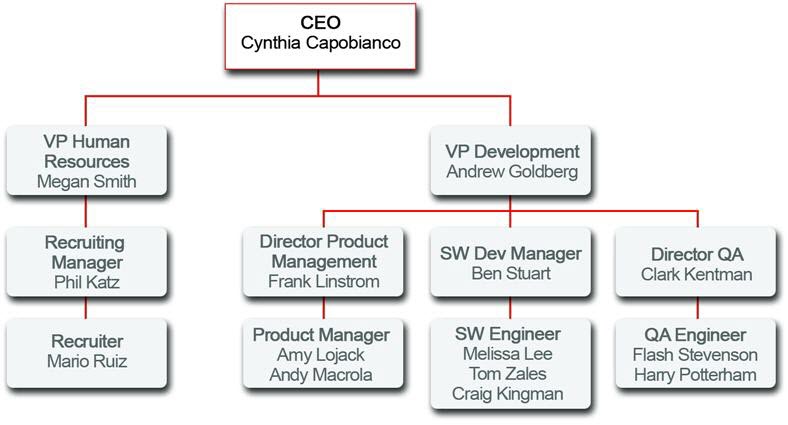
In role based access control, the role hierarchy defines an inheritance relationship among roles. above in hierarchy level can see below hierarchy level records.
6. What is the difference between role hierarchy and sharing rules?will both do the same permissions?
Sharing Rule is used to extend Role Hierarchy.
7. I want to have read permission for User 1 and read/write only for User 2, how can you achieve?
Using permission set.
1. What is Profile?
Profile contains set of permissions and access settings that controls what user can do with in the organization. Profiles define how users access objects and data, and what they can do within the application. When you create users, you assign a profile to each one.
2. What are permission sets?
A Permission Set is a collection of settings and permissions that give users access to various tools and functions. Permission set allows user to give extra access on same profile.
3. What is Organization wide defaults?
 |
| Source : Salesforce |
This can be used to give permissions to the organization wide and it can be used for restrict the access, we can control the record level access.
OWD: Private,Public Read, Public Read/Write, Public read/Write/Transfer (Lead & Case), Public Full Access (Campaign Object only)
4. What is Sharing Rules?
A Permission Set is a collection of settings and permissions that give users access to various tools and functions. Permission set allows user to give extra access on same profile.
5. What is the role hierarchy?
In role based access control, the role hierarchy defines an inheritance relationship among roles. above in hierarchy level can see below hierarchy level records.
 |
| Source : Salesforce |
Sharing Rule is used to extend Role Hierarchy.
7. I want to have read permission for User 1 and read/write only for User 2, how can you achieve?
Using permission set.